You've read those articles. We all have. "Check for idle resources." "Use Savings Plans." "Tag everything."
These are still good advices. But, the AWS bill in 2026 is a different animal. It's shaped by AI workloads you didn't budget for, networking abstractions that hide per-gigabyte charges behind managed services, and commitment models that punish you for building the wrong thing at the wrong time.
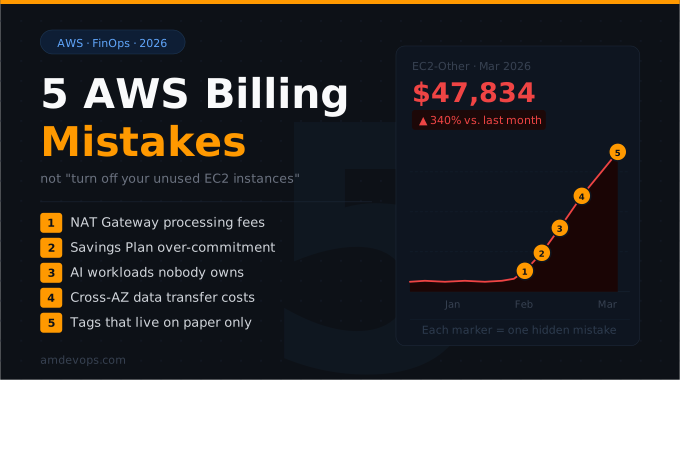
Here are five billing mistakes we see constantly at AM DevOps — and none of them are about forgotten EC2 instances.
1. You're Paying a NAT Gateway Tax on Traffic That Should Be Free
This is the single most underappreciated line item on an AWS bill.
Here's what happens: your application in a private subnet needs to reach S3. The traffic goes through a NAT Gateway. S3 data transfer? Free. The NAT Gateway processing fee on that same traffic? $0.045 per gigabyte.
That distinction is invisible unless you know to look for it. And the numbers add up fast. A containerized workload pulling images from ECR through a NAT Gateway can generate over $8,000/month in processing charges alone — for traffic to an AWS service that doesn't charge for data transfer.
The fix is almost embarrassingly simple: Gateway VPC Endpoints for S3 and DynamoDB are free. They route traffic directly, bypassing the NAT Gateway entirely. Interface Endpoints (via PrivateLink) for services like ECR, CloudWatch, and Secrets Manager cost roughly $0.01/GB — a 78% reduction compared to the NAT Gateway path.
Yet in account after account, we find workloads routing terabytes through NAT Gateways to reach AWS services that have had endpoint support for years. The reason? Nobody re-evaluated the network architecture after the initial VPC setup. The Terraform was written, it worked, and everyone moved on.
What to do right now: Pull up your VPC Flow Logs or Cost Explorer. Filter for NatGateway under the EC2-Other cost category. If that number makes you uncomfortable, you have an endpoint problem, not a compute problem.
2. Your Savings Plan Math Assumed a Future That Didn't Happen
The standard advice is correct: Savings Plans can cut your on-demand costs by up to 72%. But the standard advice skips the part where you're signing a 1- or 3-year contract based on a usage forecast, and that forecast is essentially a bet.
We've seen this play out two ways, and both are expensive.
The over-commit. A company buys $50/hour in Compute Savings Plans based on last quarter's spend. Then they migrate three services to serverless, kill a data pipeline, and consolidate two staging environments. They're now paying for $50/hour of compute whether they use it or not. Unlike Reserved Instances, you can't resell Savings Plans on a marketplace. After the initial 7-day return window, you're locked in for the full term.
The under-commit. A team is so cautious about over-committing that they cover only 40% of their steady-state usage. The remaining 60% runs at full on-demand pricing. They congratulate themselves on "being flexible" while leaving tens of thousands on the table annually.
The real mistake isn't choosing the wrong commitment level. It's treating the purchase as a one-time event instead of a rolling strategy. Your infrastructure changes every quarter. Your commitments should be reviewed on the same cadence.
What to do right now: Stop buying Savings Plans in annual batches. Layer short-term (1-year) commitments in monthly increments, covering only your rock-bottom baseline. Let on-demand or Spot handle the peaks. Re-evaluate quarterly. This isn't theoretical — according to the 2026 State of FinOps report, workload optimisation remains the top priority, but practitioners say the easy wins are gone and they're now chasing smaller, harder-to-capture savings. Commitment strategy is where those savings hide.
3. Your AI Workloads Are Running Up a Bill Nobody Owns
This is the new frontier of AWS billing chaos.
Two years ago, 31% of organizations were managing AI spend. Today that number is 98%, according to the FinOps Foundation's 2026 report. But "managing" is generous — most teams are still figuring out what their AI workloads actually cost.
The problem is structural. A developer spins up a SageMaker notebook to test a model. The notebook comes with an EBS volume attached by default. The developer stops the notebook. The EBS volume persists. Multiply that across a team experimenting with ML, and you have orphaned storage accumulating charges that no one is tracking because no one owns the AI cost center.
Bedrock is worse in a different way. Token-based pricing is intuitive when you're testing a prompt. It becomes opaque when you're running inference at scale across multiple models, each with different per-token rates. Teams estimate $2,000–$3,000/month for their Bedrock usage and routinely see bills 30–50% higher because they didn't account for input/output token ratios, retries, or the difference between on-demand and provisioned throughput pricing.
And provisioned throughput? The minimum commitment starts around $15,000/month. That's enterprise territory, but we've seen mid-stage startups purchase it because someone read it was "more cost-effective at scale" without doing the break-even math.
What to do right now: Create a dedicated AWS account (or at minimum, a distinct cost allocation tag) for all AI/ML experimentation. Enforce tagging at the IAM policy level — not as a best practice suggestion, but as a deny rule. If it's not tagged, it doesn't launch. This is the only way to get clean cost attribution before your next board meeting includes a line item labeled "AI: misc."
4. You're Ignoring Cross-AZ Data Transfer Because It "Only Costs a Penny"
$0.01 per gigabyte in each direction. Practically free, right?
At small scale, yes. But modern AWS architectures are designed to spread traffic across availability zones for resilience. An Application Load Balancer distributes requests across AZs by design. EKS and ECS place tasks across AZs by default. Every RDS read replica in a different AZ generates cross-AZ transfer on every query result.
We audited one client running a Kubernetes cluster across three AZs with about 200 services doing inter-service communication. Their cross-AZ data transfer bill was $14,000/month. Not because any single service was expensive, but because thousands of small east-west calls between microservices — health checks, cache lookups, queue messages — added up across availability zone boundaries.
The insidious part is that this cost grows linearly with your architecture's complexity. Every new microservice, every new gRPC call, every Kafka consumer group adds another stream of cross-AZ traffic. And because the per-unit cost is so low, nobody flags it until it shows up as an inexplicable 20% increase in the "EC2-Other" category.
What to do right now: Enable VPC Flow Logs and analyze cross-AZ traffic patterns. For latency-tolerant workloads, consider AZ-affinity routing (topology-aware hints in Kubernetes, or target group AZ affinity on ALBs). For high-throughput internal services, co-locate producers and consumers in the same AZ when fault tolerance requirements allow it. The goal isn't to eliminate cross-AZ traffic — it's to stop paying for cross-AZ traffic that doesn't need to be cross-AZ.
5. Your Tagging Strategy Exists on Paper and Nowhere Else
"We have a tagging policy" is the FinOps equivalent of "we have a disaster recovery plan." Both statements are meaningless until tested.
Here's what we actually see in production: one team uses env:prod, another uses Environment:production, a third uses stage:live. A FinOps practitioner at one organization reported pulling a cost report for "prod" workloads and finding 17 different tag variations. The finance team gave up. Chargebacks became fiction. Dashboards became decoration.
But the real mistake isn't inconsistent tagging. Inconsistent tagging is a symptom. The real mistake is that tagging isn't enforced at the infrastructure layer.
If your tagging policy is a wiki page that says "please tag resources with these keys," it has already failed. Tags need to be enforced through Service Control Policies, IAM condition keys, and infrastructure-as-code defaults. AWS Config rules can detect untagged resources after the fact. But "after the fact" means you're already losing cost visibility.
The 2026 State of FinOps report found that cloud unit economics climbed 5 places in organizational priority this year. You can't calculate unit economics — cost per customer, cost per transaction, cost per API call — without reliable attribution. And you can't have reliable attribution without enforced, machine-readable tags.
What to do right now: Audit your existing tags with AWS Tag Editor across all regions. Pick three mandatory tags (we recommend team, env, and service as a starting point). Implement an SCP that denies resource creation without these tags. Yes, developers will complain for a week. Then they'll add three lines to their Terraform modules and never think about it again. A week of friction prevents a year of cost allocation guesswork.
The Bigger Picture
Every one of these mistakes shares a common root cause: the AWS bill is treated as a finance problem instead of an engineering problem.
Cost optimisation doesn't happen in a spreadsheet. It happens in VPC route tables, in IAM policies, in CI/CD pipelines, and in architecture decisions made months before the bill arrives. The FinOps Foundation updated its mission this year — it's no longer about "managing the value of cloud" but "managing the value of technology." That reframing matters because it acknowledges that cost governance has to be embedded in how you build, not bolted on after you ship.
At AM DevOps, we approach AWS billing as an infrastructure discipline. If you're staring at a bill that doesn't make sense, that's not a billing problem — it's an architecture conversation waiting to happen.
AM DevOps is an AWS consulting partner specialising in cloud architecture, DevOps, and cost optimisation. If your AWS bill has line items you can't explain, Let's Talk.